
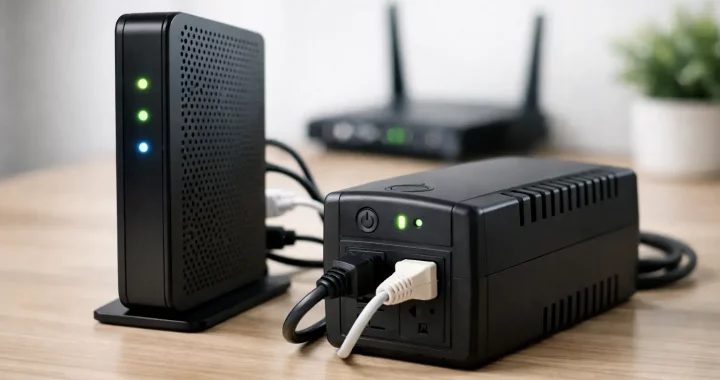
Your Wi-Fi usually fails for a simple reason during an outage: the modem and router lose power long before your phone or laptop does. If your provider is still up in your area, a backup battery for internet modem use can keep your connection running for hours instead of minutes.
That matters more than most people realize. Home security systems, video calls, remote work, school access, smart home controls, and basic communication all depend on a stable internet connection. When the grid drops, keeping your modem online is often one of the easiest and most useful backup power upgrades you can make.
Why a backup battery for internet modem setups matters
A modem does not draw much power, and neither does a typical Wi-Fi router. In many homes, the combined load is modest enough that a relatively small battery can keep both running for a long time. That makes this one of the most efficient backup power uses in the house.
The catch is that not every outage behaves the same way. Sometimes power is out for ten minutes. Sometimes it is gone for half a day. Sometimes the internet provider loses local infrastructure too, which means your modem can have power but still no signal. A battery backup is not a guarantee of service, but when the provider network stays active, it can preserve the one connection that keeps the rest of your plan working.
For many households, that changes the outage from disruptive to manageable. You can keep receiving weather alerts, send messages, run a hotspot alternative through home Wi-Fi, and continue using connected devices that rely on your local network.
How much power does a modem and router actually need?
Most internet modems use roughly 8 to 20 watts. Many routers fall in the 6 to 15 watt range. If you are powering both, your total load may land somewhere between 15 and 35 watts, though mesh systems, advanced gaming routers, and fiber equipment can push that higher.
The best way to know is to check the label on each power adapter. Look for output voltage and amperage, then multiply volts by amps to estimate watts. If your modem adapter says 12V and 1.5A, that is about 18 watts. If your router says 12V and 1A, that is 12 watts. Together, that is around 30 watts.
This low draw is good news. A battery with 300 watt-hours of usable capacity could theoretically support a 30-watt load for about 10 hours before conversion losses. Real-world runtime is usually lower because no power system is perfectly efficient, but the math shows why modem backup does not usually require a large, heavy unit.
UPS or portable power station?
This is where people often buy the wrong thing.
A traditional UPS, or uninterruptible power supply, is built for instant switchover. It is common in offices because it bridges short outages without letting computers shut off. For a modem and router, a UPS can be a practical choice if your main concern is short interruptions, flickers, or brief blackouts. It is compact, familiar, and designed to stay plugged in.
But a UPS often has limited runtime. Many consumer models are made to provide enough battery life to save work and shut equipment down safely, not to keep an internet setup alive all day.
A portable power station is different. It usually offers much more battery capacity, quiet operation, and broader output options. It can support modem and router backup for far longer, and it can do double duty during emergencies by powering phones, laptops, lights, radios, and other essentials. If preparedness is the goal, not just short ride-through protection, a portable power station is often the stronger long-term solution.
The trade-off is transfer behavior. Some power stations support UPS-style pass-through, but not all of them switch as fast as a dedicated UPS. If your modem is sensitive to even a brief interruption, that matters. If a reboot is acceptable and your priority is longer runtime, a portable power station can be the better fit.
What to look for in the best backup battery for internet modem use
Capacity is the first number to pay attention to, but it should not be the only one. A bigger battery gives longer runtime, but buying far more capacity than you need can be unnecessary if your only goal is to keep internet alive.
Output type matters just as much. Most modems and routers use AC wall adapters, so an AC outlet on the battery makes setup simple. Some compact backup systems also support DC output that matches networking equipment more directly. That can improve efficiency, but only if the voltage and connector are right.
Battery chemistry is another factor. LiFePO4 batteries are especially attractive for backup use because they offer long cycle life, strong thermal stability, and dependable performance over time. For a system you may keep plugged in and ready for years, that matters.
You should also look at noise, recharge speed, and expandability. A quiet battery system is ideal for a bedroom, office, or family room. Fast recharging helps you recover between outages. Expandability may not matter for a modem alone, but it can matter if you expect the same unit to support more devices later.
Sizing your battery the practical way
Start with the combined wattage of your modem and router. Then decide how long you want them to stay online. Multiply watts by hours to estimate the watt-hours you need, then add a buffer for losses and real-world variation.
If your equipment draws 25 watts and you want 8 hours of runtime, that is 200 watt-hours before losses. With a sensible margin, you may want something in the 250 to 300 watt-hour range or higher. If you want to stretch to overnight coverage, moving up in capacity makes sense.
This is where your use case matters. For occasional short outages, a compact unit may be perfect. For storm season, remote work, or homes that rely on internet for security and communication, a larger battery gives more breathing room.
Common mistakes people make
The first mistake is assuming the modem alone is enough. In most homes, you need both the modem and the router powered, and in some fiber setups you may also need an optical network terminal. If one piece is left out, the internet still goes down.
The second mistake is overestimating provider resilience. Your battery only helps if the service infrastructure in your area is still functioning. Cable and fiber networks often stay live during local outages, but not always. It depends on how the provider has backed up neighborhood equipment.
Another common issue is ignoring startup behavior. Some networking gear can be finicky about power interruptions. If your battery system does not provide true UPS-like switching, your modem may reboot during transfer. That is not always a deal-breaker, but you should know whether you need uninterrupted handoff or simply extended runtime.
When a portable power station makes more sense
If your outage plan goes beyond internet, a portable power station is hard to beat. The same unit keeping your modem and router online can also charge phones, run a laptop, power a lamp, and support small essentials while the grid is down. That flexibility is why many households move past single-purpose battery backups.
It also simplifies preparedness. Instead of buying one device for the modem, another for phone charging, and another for emergency lighting, you can centralize those needs in one quiet battery system. For buyers comparing value, that broader usefulness often matters more than shaving a little cost off a modem-only solution.
This is where a retailer like Thundervolt Power fits naturally. The advantage is not just battery capacity. It is choosing a power setup built for real outage use, with lithium-based performance, practical outputs, and enough reserve to support communication first and other essentials next.
Setup tips that improve reliability
Keep the battery near your modem and router, but make sure it has proper ventilation. Label the power cords so anyone in the house can reconnect equipment quickly if needed. If your internet service depends on extra hardware, include that in your backup plan now rather than discovering it mid-outage.
Test the system before you need it. Unplug utility power and see what happens. Check whether your modem stays online, whether your router reconnects, and how long the battery actually lasts. This simple test tells you more than any spec sheet.
If your goal is the longest possible runtime, reduce unnecessary load. You may not need a secondary mesh node, a network switch, or nonessential accessories running during an outage. Powering only the core equipment can stretch battery life significantly.
The right choice depends on how you use your connection
There is no single best backup battery for internet modem setups in every home. The right one depends on whether you want instant switchover or longer runtime, whether you are backing up just a modem and router or a fuller communications setup, and whether this is a convenience purchase or part of a serious outage plan.
If you only want to ride through short interruptions, a UPS may be enough. If you want reliable internet through longer outages and the flexibility to power other essentials too, a portable power station usually offers more practical value.
Preparedness works best when it focuses on the basics first. Keep the connection alive, keep communication open, and choose a battery system that gives you enough margin to stay steady when power is not.
