
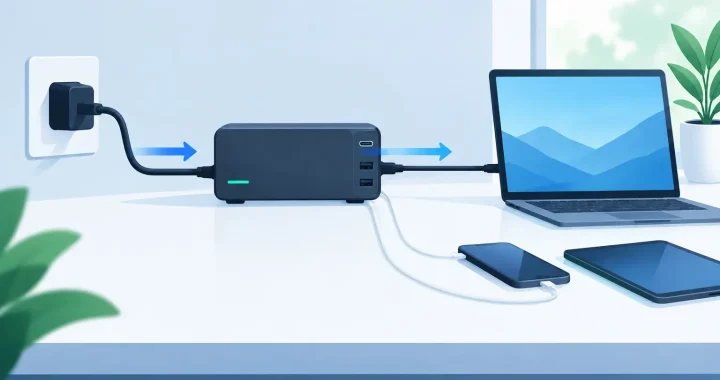
A pass through charging setup can keep a phone, CPAP machine, router, laptop, or small appliance powered while your portable power station is still receiving power from a wall outlet, solar panel, or vehicle outlet. When the grid is unstable or you are working away from home, that capability can reduce interruptions and make stored energy more useful.
It is not a feature to assume every power station handles the same way. Input limits, output limits, thermal management, and manufacturer guidance all matter. Set it up correctly, and pass-through charging becomes a practical part of a preparedness plan. Set it up carelessly, and you may encounter slow charging, battery drain, overheating, or an overloaded system when you need it most.
What Pass-Through Charging Actually Does
Pass-through charging means a power station accepts incoming electricity while also delivering electricity through its AC, DC, or USB outputs. For example, a station can charge from an AC wall outlet while your modem and router remain plugged into its AC outlets. If utility power fails and the unit supports the needed transfer behavior, the station can continue supplying those connected devices from its battery.
The feature is especially useful when keeping a small group of essentials online matters more than powering an entire home. A home office setup, internet equipment, medical device, security camera system, or refrigerator can benefit, provided the station has enough output capacity and battery storage for the job.
Pass-through charging is not always the same as an uninterruptible power supply, or UPS. Some units switch to battery power quickly enough for many electronics, while others have a brief transfer interval that may restart sensitive equipment. If constant operation is critical, confirm the product’s UPS or EPS specifications rather than relying on the phrase pass-through charging alone.
Choose the Right Power Station Before You Build
Start with the equipment you need to keep running. Add the running watts of every device, then compare that number to the power station’s continuous AC output rating. A 600-watt station may handle a router, laptop, lights, and a TV, but it is not the right choice for a microwave, space heater, or large window air conditioner.
Battery capacity matters just as much. Capacity is measured in watt-hours, or Wh. A 1,000Wh battery does not provide a full 1,000Wh to AC devices because the inverter uses some energy during conversion. For planning purposes, expect usable AC capacity to be lower than the listed battery capacity. The exact result depends on the power station, temperature, and load.
Also verify that pass-through operation is supported on the specific inputs and outputs you intend to use. A model may allow AC input and USB output simultaneously, for instance, but have different limits for AC input plus AC output. Read the product manual before connecting essential loads.
For longer outages, consider a LiFePO4 power station with expansion battery capability. LiFePO4 chemistry is valued for long cycle life and thermal stability, while expansion batteries can increase runtime without requiring a completely separate system. For homes that need flexible preparedness options, Thundervolt Power focuses on portable systems designed around that kind of practical capacity planning.
How to Build a Pass Through Charging Setup
A dependable setup follows a simple order: calculate the load, establish a reliable charging source, connect priority devices, and test the system before an emergency.
1. Separate essential loads from convenience loads
Do not treat every device in the house as equally important. During an outage, prioritize the equipment that protects communication, health, food, work, or safety. That may include a modem, router, phone chargers, LED lamps, a CPAP machine, a laptop, or a refrigerator.
High-wattage heating appliances are usually poor candidates for a portable battery setup. Space heaters, electric grills, hair dryers, and coffee makers can drain a battery quickly even when the station can technically run them. Use fuel or other heating arrangements where appropriate, and reserve stored electricity for the loads that keep your household functional.
2. Connect the charging source first
For home readiness, AC wall charging is the most predictable input source. Plug the power station directly into a properly grounded wall outlet using its supplied charging cable. Avoid placing the unit on a crowded power strip or connecting it through questionable extension cords.
For off-grid use, solar can maintain or replenish the battery during daylight. Match your solar panels to the station’s accepted voltage and input current range. More panel wattage does not automatically mean faster charging if the station caps solar input lower than the panels’ potential output.
Vehicle charging can be useful while traveling, but it is usually slower than AC or properly sized solar charging. Never run a vehicle in an enclosed space to charge a power station. Carbon monoxide is a serious hazard, and portable battery power should not create a safety problem it was meant to solve.
3. Turn on only the outputs you need
Connect your priority devices to the appropriate output type. USB ports are efficient for phones and tablets. DC outputs may suit compatible 12V equipment. Use AC outlets for items that require household-style power, such as a modem, laptop charger, CPAP machine, or small appliance.
Leaving every output bank active can increase idle power draw. If you only need USB charging overnight, turn off the AC inverter. Small settings like this can add meaningful runtime when the outage lasts longer than expected.
4. Watch input, output, and battery percentage together
The display on your power station tells the real story. If the station is receiving 200 watts from solar but your devices are consuming 350 watts, the battery will still decline. That does not mean the setup is failing. It means your load is larger than your available input.
This is the key trade-off in any pass-through arrangement. Incoming power can reduce battery drain or recharge the battery, but it cannot overcome a sustained load larger than the source can provide. On cloudy days, solar production may fall sharply. During a heat wave, a refrigerator may consume more energy than expected. Plan with margin rather than assuming ideal conditions.
Safe Placement and Heat Management
Portable power stations need airflow. Place the unit on a stable, dry, hard surface with clear space around its vents. Do not cover it with blankets, store it in a sealed cabinet, or leave it in direct summer sun while it is charging and powering equipment at the same time.
Heat is one of the main reasons a station may reduce charging speed or temporarily stop output. Charging and running an inverter both create heat, especially under heavier loads. If the unit feels unusually hot, reduce the load, move it to a cooler ventilated area, and consult the manual for its operating temperature range.
Keep cables organized and inspect them periodically. A loose AC plug, bent solar connector, or damaged extension cord can cause charging interruptions and create electrical risk. Use appropriately rated cords, especially when supplying a refrigerator or other appliance with a startup surge.
Test Your Setup Before the Weather Turns
The first outage should not be the first time you use your system. Run a test at home for several hours. Connect your actual devices, confirm the station accepts input while delivering output, and observe how quickly the battery changes at normal household loads.
If you are protecting internet access, unplug the wall power after the system is fully connected and watch what happens. Does the router stay online? Does the modem reboot? Does the power station switch quickly enough for your needs? Those answers determine whether the setup is suitable for communications, remote work, or equipment that cannot tolerate a restart.
For solar users, test in realistic conditions instead of relying only on a panel’s advertised wattage. Measure output in the morning, around midday, and under partial cloud cover. Position matters, and even minor shading can cut solar production significantly.
A short readiness checklist helps prevent avoidable problems:
- Keep the power station charged to the storage level recommended by its manufacturer.
- Label the devices that belong on the emergency power circuit.
- Store AC, car, and solar charging cables together in a dry location.
- Recheck battery status and perform a load test every few months.
When Pass-Through Charging Is Not the Best Choice
There are situations where direct charging and direct use are better. If your station is in a hot vehicle, running near its maximum output, or receiving weak solar input, adding pass-through operation can increase heat and reduce efficiency. Let the station recharge first, then run the load if the situation allows.
It may also be better to use a dedicated UPS for desktop computers, network storage, or sensitive electronics that require nearly instantaneous transfer. A portable power station can provide much longer runtime, but its switchover performance may not match a purpose-built UPS.
For critical medical equipment, follow the equipment manufacturer’s backup-power guidance and consult a qualified professional when needed. A portable power station can be a valuable layer of protection, but it should be sized and tested for the device’s actual power requirements.
A well-planned pass through charging setup gives you more than a charged battery. It gives you a tested power path for the moments when utility power is not stable, travel plans change, or weather demands quick action. Build that path now, keep the load focused, and you will have dependable power ready when it counts.
